Multi-Tenant Social Media SaaS Platform
Table of contents
Overview
Two-month final-year project built a full social media management system with my teammate. It included Facebook/Instagram account management, team workspaces, permissions, post scheduling, and automated data synchronization. The two critical systems underneath were the multi-tenant architecture, each user data isolated in its own MongoDB database, and the sync engine that kept analytics, posts, and page data updated through scheduled jobs and manual refresh triggers. I will dive into the details and architecture decisions for these two functionalities, as they were the most interesting parts of the SAAS.
The Problem This SaaS Solves
Marketing agencies and community managers juggle multiple Facebook and Instagram accounts, constantly switching contexts to publish posts, check insights, or manage conversations. This SaaS centralizes everything into one workspace: unified dashboards, cross-platform post scheduling, and automated data sync. It also solves shared-access issues by providing team workspaces with granular permissions, so owners can delegate work without sharing platform credentials.
The Challenge
The platform had two key features that needed careful attention. First, tenant isolation, every user's data had to live in its own MongoDB database so there was no risk of showing one team's analytics to another. Second, social media synchronization so dashboards would show current data from Facebook and Instagram, profile stats, post performance, engagement insights, and account permissions, without users having to manually refresh. The tricky part? Facebook's API rate limits, token expiration, and the sheer volume of data we needed to pull for potentially hundreds of users. We had to make it automatic, reliable, and fast enough that users would never notice it happening in the background.
System Architecture
Technical Implementation
1. Tenant Isolation Architecture
We implemented a multi-tenant system where each user has its own isolated MongoDB database, ensuring full data separation and secure, per-tenant operations.
We used a database-per-tenant design to ensure strict isolation and simplify scaling while schema-per-tenant adds complexity as tenants grow due to managing many schemas. and for database, We chose MongoDB for its flexibility with document and JSON data, which fits naturally with social media structures and dynamic tenant connections.
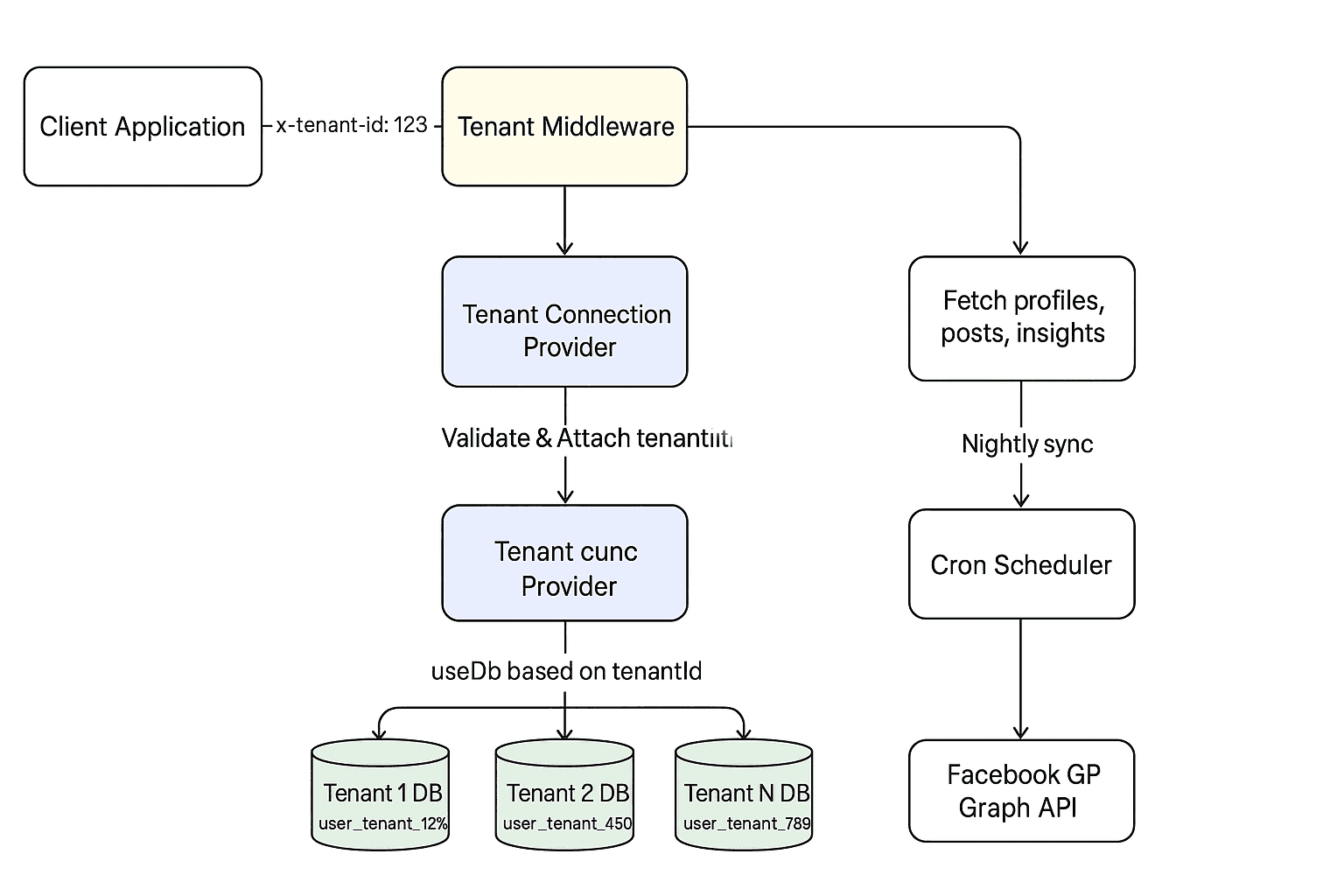
Every API request carries an x-tenant-id header that determines database routing. The workflow is straightforward: incoming requests first pass through middleware that validates the tenant ID, then a connection provider uses that ID to switch to the correct database, and finally tenant-scoped models are created dynamically to interact with that database. This means every query, insert, or update automatically targets the right tenant's data without any manual switching in the business logic.
Tenant Middleware
This middleware intercepts every incoming request and validates the x-tenant-id header. It checks if the tenant exists in the system and attaches the tenant ID to the request object, making it available throughout the request lifecycle. If the header is missing or the tenant doesn't exist, the request is rejected immediately.
tenants.middleware.ts
1
2
3
4
5
6
7
8
9
10
11
12
13
14
15
16
17
@Injectable()
export class TenantsMiddleware implements NestMiddleware {
  constructor(private readonly tenantsService: TenantsService) {}

  async use(req: Request, _res: Response, next: NextFunction) {
    const tenantId = req.headers['x-tenant-id']?.toString();

    if (!tenantId) throw new BadRequestException('x-tenant-id not provided');

    const tenantExist = await this.tenantsService.findByTenantId(tenantId);

    if (!tenantExist)throw new NotFoundException(`tenant with id ${tenantId} not found`);

    req['tenantId'] = tenantId;
    next();
  }
}
Dynamic Database Connection Provider
This provider takes the tenant ID from the request and uses MongoDB's useDb() method to switch to the tenant-specific database. It's injected at the request scope, meaning each request gets its own database connection pointing to the correct tenant. This is the core mechanism that enables true database-level isolation.
tenantConnection.provider.ts
1
2
3
4
5
6
7
8
9
10
11
12
export const TenantConnectionProvider = {
  provide: 'TENANT-CONNECTION',
  useFactory: async (request, connect: Connection) => {
    const tenantId = request.tenantId;
    if (!tenantId)
      throw new InternalServerErrorException(
        'verify that the tenant middleware is called.',
      );
    return connect.useDb(`user_tenant_${tenantId}`);
  },
  inject: [REQUEST, getConnectionToken()],
};
Tenant-Scoped Model Factory
These model providers create Mongoose models using the tenant-specific database connection. Each model (Post, Channel, FacebookPage, etc.) is bound to the correct tenant's database automatically. This pattern keeps the service layer clean—you never have to worry about which database you're querying because the DI system handles it.
tenantsModels.provider.ts
1
2
3
4
5
6
7
8
9
10
export const tenantsModel = {
  channelModel: {
    provide: 'CHANNELS-MODEL',
    useFactory: async (connect: Connection) => {
      return connect.model(Channel.name, ChannelSchema);
    },
    inject: ['TENANT-CONNECTION'],
  }
  // other models must be added here
};
Usage Example of the Model
This shows how simple the service layer becomes. You just inject the model and use it like any other Mongoose model—no special logic needed. The tenant routing happens completely behind the scenes through the DI system, so channelModel.find() automatically queries the correct tenant's database based on the request context.
channels.service.ts
1
2
3
4
5
6
7
8
9
10
11
12
@Injectable()
export class ChannelsService {
  constructor(
    @Inject('CHANNELS-MODEL')
    private readonly channelModel: Model<Channel>,
    private readonly userService: UserService,
    private readonly platformService: PlatformsService,
  ) {}
  async findAll(): Promise<ChannelDto[]> {
    return await this.channelModel.find().populate('platform').lean();
  }
};
2. Social Media Synchronization
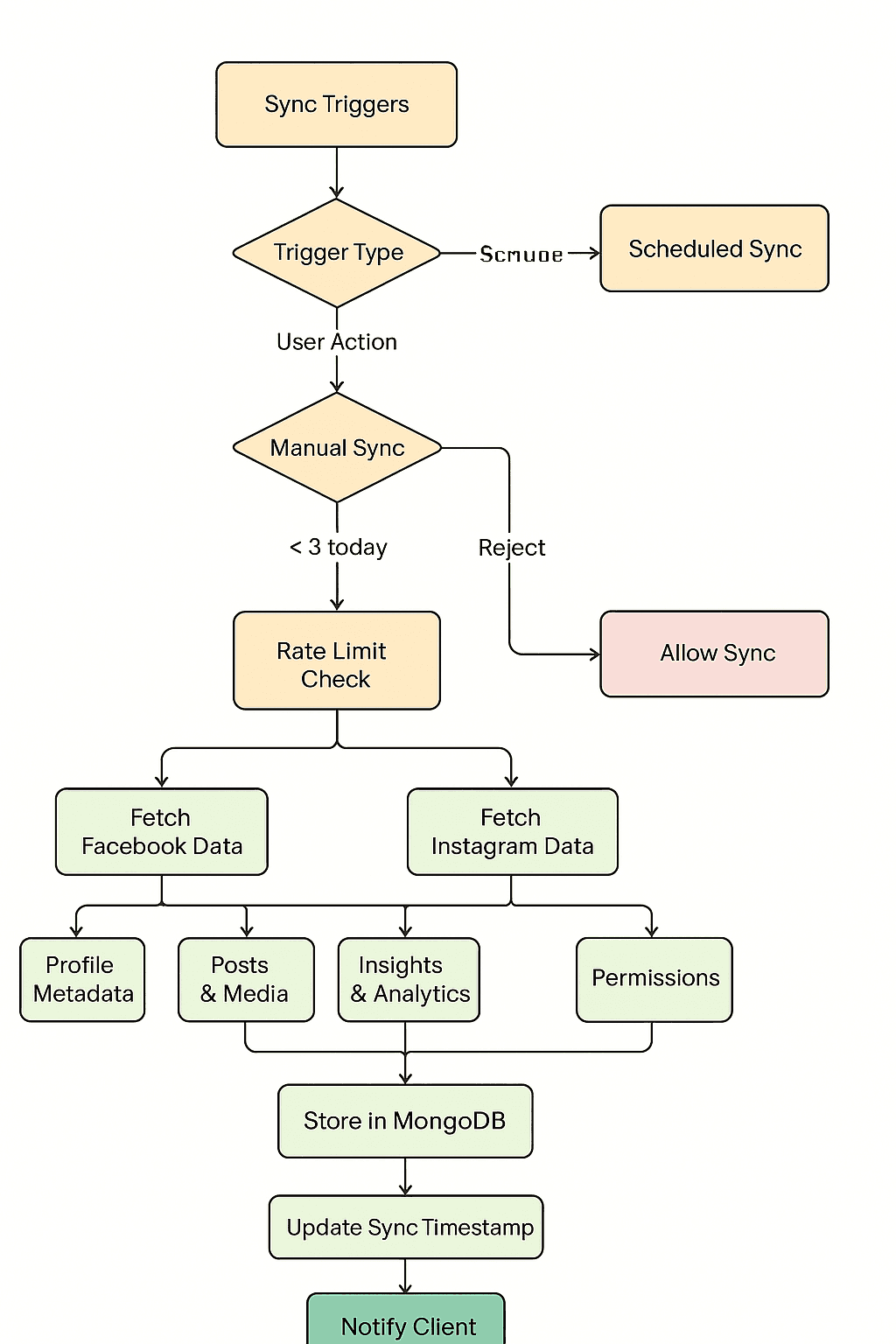
We built a dual-trigger sync system to keep dashboards current with automated and manual refresh options. The workflow operates on two paths: scheduled cron jobs run automatically at midnight (daily stats), weekly, and monthly to pull fresh data for all tenants, while users can also trigger manual syncs for immediate updates. Both paths hit the Facebook Graph API to fetch page data, posts, insights, and engagement metrics, then store everything in the tenant's database. Manual syncs are protected by rate limiting to prevent API quota exhaustion.
Sync Flow Architecture
Cron-Based Sync Service
This service runs three scheduled jobs at different intervals. The daily job (midnight) refreshes basic page data and recent posts. The weekly job pulls engagement insights that Facebook aggregates over 7-day periods. The monthly job fetches long-term analytics that are only available on a monthly basis. Each job iterates through all active tenants and updates their Facebook data automatically, so users wake up to fresh metrics without lifting a finger.
facebook-sync-manager.service.ts
1
2
3
4
5
6
7
8
9
10
11
12
13
14
15
16
17
18
19
20
21
22
23
24
25
26
27
@Injectable()
export class FacebookSyncManagerService {
  private readonly logger = new Logger(FacebookSyncManagerService.name);
  constructor(
    private readonly tenantsService: TenantsService,
    private readonly platformsService: PlatformsService,
  ) {}

  @Cron(CronExpression.EVERY_DAY_AT_MIDNIGHT)
  async handleFacebookPageData() {
    this.logger.log('scheduled lunched');
    await this.refetchFacebookPagesDataForAllTenants();
  }

  @Cron(CronExpression.EVERY_WEEK)
  async handleWeeklyStatsForFacebookPage() {
    this.logger.log('weekly stats scheduling lunched');
    this.refetchFacebookPageWeeklyInsightsForAllTenants();
  }

  @Cron(CronExpression.EVERY_1ST_DAY_OF_MONTH_AT_MIDNIGHT)
  async handleMonthlyInsightsForFacebookPage() {
    this.logger.log('monthly Insights scheduling lunched');
    this.refetchFacebookPageMonthlyInsightsForAllTenants();
  }
  // reset of code
};
Manual Sync with Rate Limiting
When users want immediate updates, they can trigger a manual sync through the /refetch/:id endpoint. The ThrottlerGuard enforces rate limits to prevent abuse—if a user hits their limit, they get a 429 response with the time until they can sync again. The service fetches fresh data from Facebook's API, then processes each connected page by updating posts, comments, and engagement metrics in parallel. This gives users control while protecting the system from excessive API calls.
Controller
1
2
3
4
5
6
7
8
9
10
11
@Get('refetch/:id')
@UseGuards(MyThrottlerGuard)
async refetchData(@Param('id') id: string, @Req() req: any) {
  try {
    return await this.facebookSync.refetchRequest(id, req.tenantId);
  } catch (error) {
    console.error(error);
    throw new InternalServerErrorException('failed');
  }
}
Guard
1
2
3
4
5
6
7
8
9
10
11
12
13
14
15
export class MyThrottlerGuard extends ThrottlerGuard {
  protected throwThrottlingException(
    _context: ExecutionContext,
    throttlerLimitDetail: ThrottlerLimitDetail,
  ): Promise<void> {
    const timeToReset = throttlerLimitDetail.ttl;
    throw new HttpException(
      {
        message: 'you have reached your limit, it will be rest ',
        timeToReset,
      },
      429,
    );
  }
}
Service
1
2
3
4
5
6
7
8
9
10
11
12
13
14
15
16
17
18
19
20
21
22
23
24
25
26
27
28
29
30
async refetchRequest(id: string, tenantId: string) {
  const channelModel = this.tenantsService.getModel(
    Channel.name,
    ChannelSchema,
    tenantId,
  );
  const channel = await channelModel.findById(id);
  const fetchedPages = await FacebookPageApi.accountPages(
    channel.accessToken,
  );

  const channelPostModel = this.tenantsService.getModel(
    ChannelPost.name,
    ChannelPostSchema,
    tenantId,
  );

  // get other models (facebookPageModel, postModel, channelPostModel, commentModel) the same way

  await Promise.all(
    fetchedPages.map(async (page) => {
      await this.processFacebookPage(page, channel._id, {
        facebookPageModel,
        postModel,
        channelPostModel,
        CommentModel,
      });
    }),
  );
}
Results
✓ Verified tenant isolation:
Request-scoped routing and per-tenant databases prevented any cross-tenant access during testing
✓ Fast tenant provisioning:
New tenant databases could be created and wired into the system without manual DevOps steps
✓ Reliable data updates:
Manual and scheduled sync workflows consistently pulled fresh data from the Facebook Graph API during test runs
✓ Controlled API usage:
Rate-limit protection and job scheduling prevented sync spikes or throttling during development